

| Highlights: |
|
If you've been using ChatGPT for a while, you already know what regular chat looks like: you type a question, get an answer, and move on. That interaction is useful, but it's still fundamentally a back-and-forth conversation. You're doing the thinking, the clicking, and the follow-through. The AI is just the source.
Agents work differently. Instead of answering your question and stopping, a ChatGPT agent takes your goal and works toward it — on its own, across multiple steps, using real tools. You describe the outcome you want. The agent figures out how to get there.
Regular Chat Answers You. Agents Act for You
The distinction is worth understanding clearly, because it changes how you think about using these tools at work.
In a standard ChatGPT conversation, the model is reactive. You ask, it responds. Each message is essentially its own transaction. The AI has no ability to open a browser, access your files, run code, or do anything beyond generating text in that single exchange.
An agent operates differently. It can plan a sequence of steps, execute each one, check the result, and adjust — all in a single session, without you manually doing each step. Ask it to research three competitors and put together a summary slide, and it will browse the web, compile what it finds, and produce a finished document. You didn't have to go back and forth ten times to get there.
The practical difference: regular chat is a thinking partner. Agents are closer to a capable assistant who can actually do the task.

Agents Have Access to Your Tools and the Web
When you give a ChatGPT agent a task, it doesn't just respond. It gets to work. It can search the web, open documents, pull data, write and run code, and produce a finished deliverable, all in one session. The technical infrastructure behind this doesn't matter much in practice; what matters is that it can complete multi-step work that would otherwise stay on your to-do list.
On top of the built-in tools, ChatGPT supports connectors, which are direct integrations with external apps like Gmail, Google Calendar, GitHub, and others. When connected, the agent doesn't just search the web generically; it pulls from your data. It can look at your actual inbox, your specific calendar, and your files.
Building Your First Agent
Your agents live in the left panel of your ChatGPT account, alongside your regular chat history. To create one, press the “Agents” button and you'll see two paths to create your own.
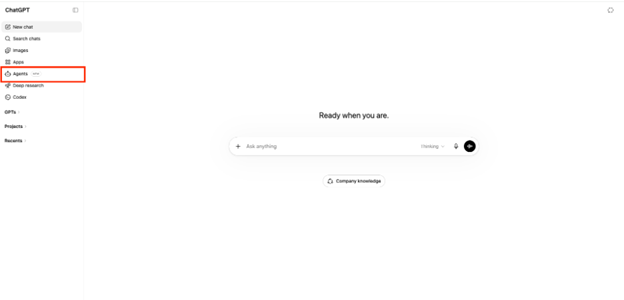
The first path — and the one worth starting with — is to describe what you need in the chat. Type something like "I want an agent that checks my calendar each Monday morning and emails me a summary of the week ahead," and ChatGPT takes it from there. It writes the agent's instructions for you, identifies which apps it needs to connect (Google Calendar, Asana, Gmail, and others depending on your task), and sets it up.

You can also tell it to schedule the agent to run automatically — daily, weekly, or on a custom cadence — without touching any settings manually. If something isn't right, just ask for edits in the same conversation and it will adjust.
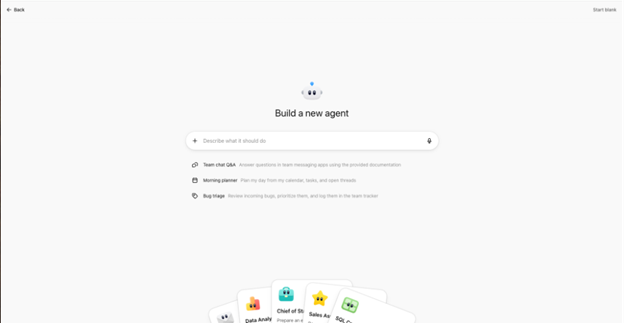
The agent can also write its own skills. Skills are small, reusable actions it knows how to perform as part of its workflow, like formatting a specific type of report or pulling data from a particular source. You don't have to define these yourself; describe the outcome and the agent figures out what it needs.
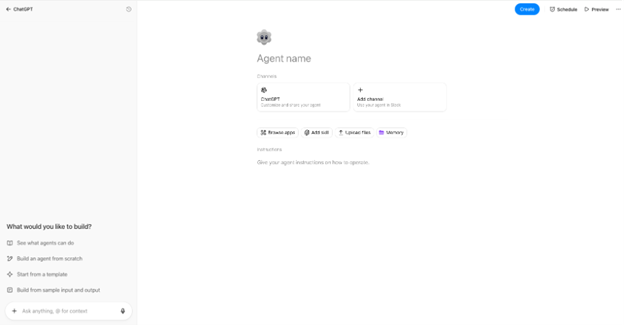
If you feel comfortable building agents from scratch you can also use the Agent Builder. This is a structured interface where you write the agent's instructions manually, define what it should do, and add apps and skills one by one. It gives you full control, but it assumes you already know what you want and how to describe it precisely. This is better for refining an agent you've already thought through.
Templates make it even faster to get started. ChatGPT includes pre-built agent templates for common use cases. The Marketing Strategy template, for example, creates an agent designed to help build and refine go-to-market strategy. It walks you through connecting your relevant tools (Google Drive, your CRM, email, etc), creates the skills needed to pull competitive data and draft strategy frameworks, and gives you a ready-to-run agent in a few minutes. Templates are a good way to see what a well-structured agent looks like before building your own.
Once your agent is set up, you can share it with your team, across your organization (on Business or Enterprise plans), or keep it private. A shared agent means everyone is working from the same workflow, with the same connected tools and the same instructions, rather than each person building their own version from scratch.

Three Ways to Put It to Work
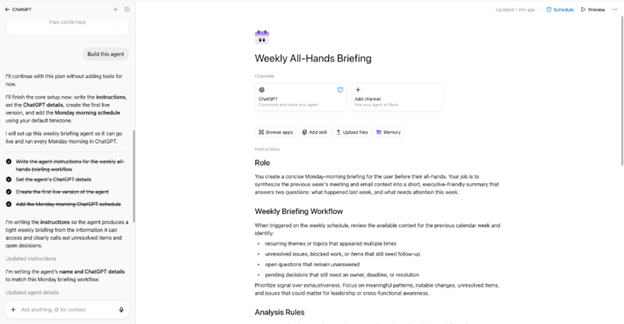
1. Simple: Summarize your week before Monday's all-hands
Connect ChatGPT to your calendar and Gmail and ask it to do two things at once: pull everything from your calendar for the past week, identify the recurring topics and open threads, and scan any long email chains like vendor negotiations, client back-and-forths, and internal debates to extract the key questions and where things stand. The output is a short briefing you can read in two minutes before your Monday all-hands: what happened last week, what's still unresolved, and what needs a decision.
This is the right place to start if you've never used an agent before. It's low-stakes, easy to verify, and saves real time every single week.
Sample prompt to start building the agent: “Build me an agent that runs every Monday morning. It should connect to my Google Calendar and Gmail, pull everything from my calendar in the past week, identify recurring topics and anything still unresolved, and scan any long email threads for open questions and pending decisions. The output should be a short two-paragraph briefing I can read before my all-hands — what happened last week and what needs attention this week.”
2. Intermediate: Research a prospect before a sales call
Give the agent a company name and ask it to look up recent news, check their LinkedIn for key leadership changes, identify any relevant funding rounds or product announcements, and pull it all into a one-page brief. Connect your Gmail connector and it can also scan recent email history with that contact so nothing is missing.
What used to take 45 minutes of manual research becomes a background task you kick off while doing something else. The output is ready when you need it.
3. Advanced: Build a competitive landscape deck using live web data + your own files
This is where agents start to show what they can do when connectors and tools are stacked together. Give the agent three competitor names, ask it to find their recent product announcements, pricing changes, and customer reviews from the past 90 days, then cross-reference with the strategy document sitting in your Google Drive, and produce a formatted slide deck summarizing where you stand.
The agent browses the web, reads your internal file, reasons across both, and builds a document combining live external data with your own context in a single output. This used to require a researcher, an analyst, and a designer. It's now a single prompt.
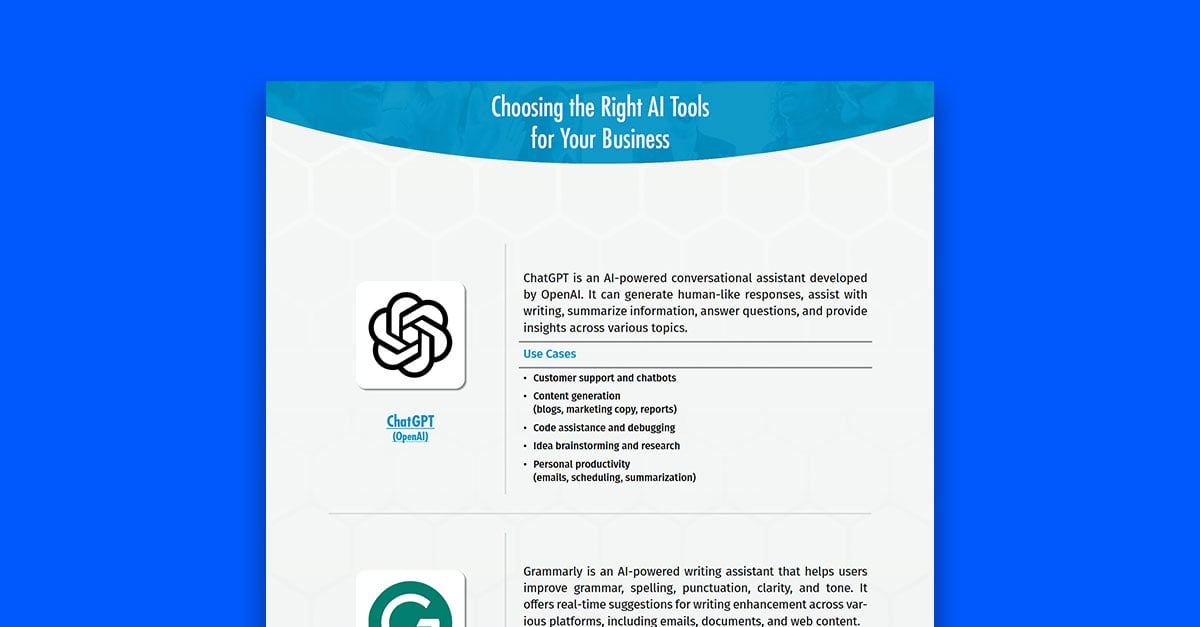
ChatGPT Isn't the Only One - Copilot and Claude Have Agents Too
This blog is about ChatGPT Agents, but the same capability is available across other major AI platforms.
Microsoft Copilot has built agents directly into its Microsoft 365 environment, where they're increasingly becoming the default mode of interaction. Copilot agents can work across Teams, Outlook, SharePoint, and other M365 tools.
Claude has its own agentic capabilities, available through Claude.ai and the Claude desktop app. Claude's agents can work with files, run code, search the web, and connect to external tools, with a particular emphasis on longer, more complex tasks and careful, step-by-step reasoning.
The underlying idea is the same across all three: give the AI a goal, not just a question, and let it figure out the steps. The differences come down to which tools each platform connects to, how much control you have during the process, and which environment your team is already working in. If you're a Microsoft shop, Copilot agents may be the natural starting point. If you're already in ChatGPT, the agent is right there in your existing account.
Whichever platform you use, agents are now a standard feature worth knowing how to use.
